ReOs guide
SheetJet
SheetJet publishes a whole set of sheets in one run, to PDF, DWG, DXF, DGN, DWF, IFC, NWC and images, with file names you can see before you start.
Publish panelFree · 200 files/monthPro · unlimited
Click a number on the picture to read its note.
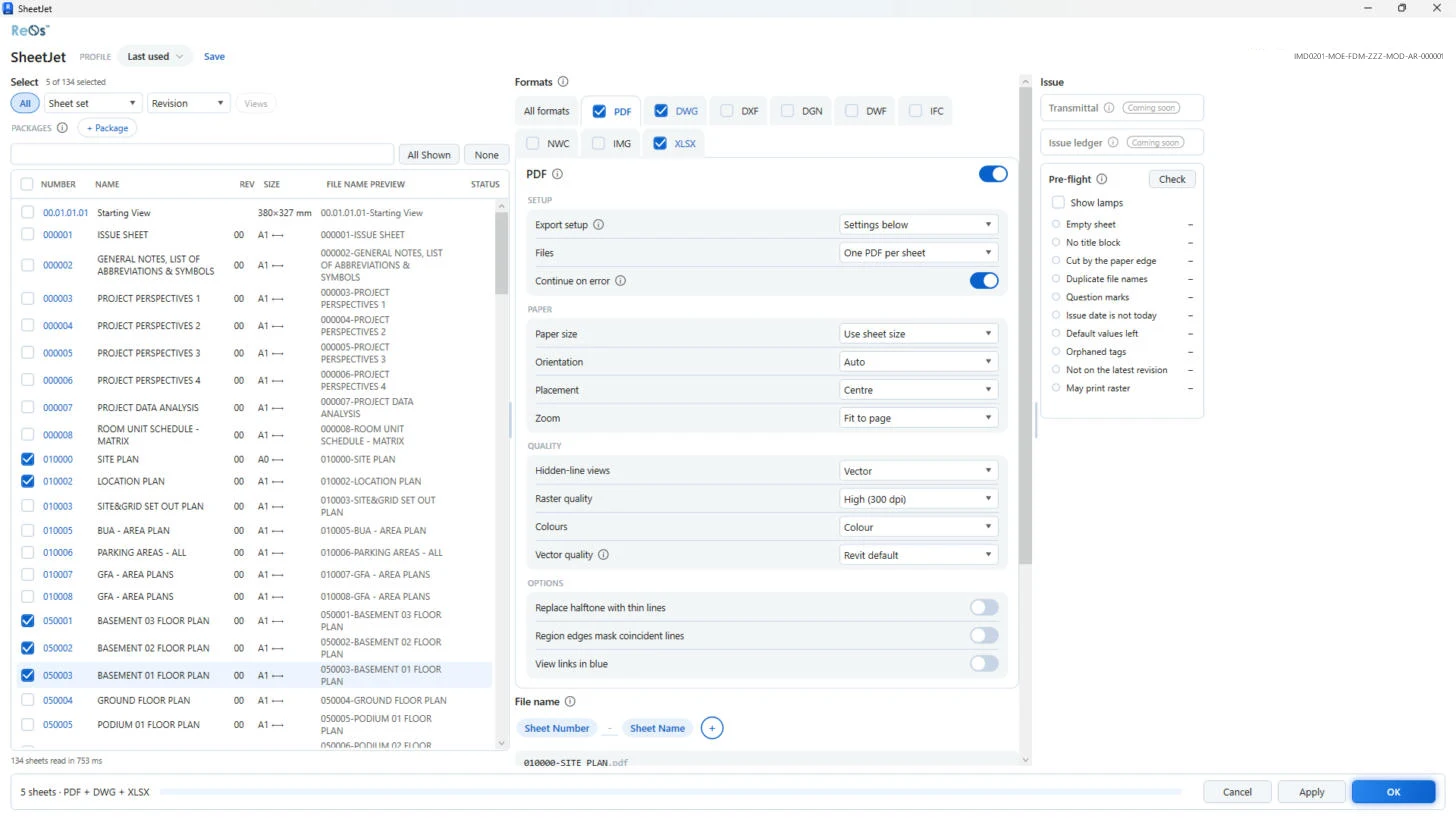
Office profilePro
A profile keeps your whole setup: formats, naming and options. Pick it, and the office publishes the same way every time. Save writes your changes back to it.
Pick the sheets
Take everything, a sheet set, or tick sheets one by one. The counter shows how many you picked. Filtering by revision is a Pro option.
Names before you publish
Every file name is shown before anything is written, so a wrong name never reaches the client.
All formats in one run
Tick each format you need. One click publishes PDF and DWG together, or any mix. Excel schedules (XLSX) are Pro.
Overrides for this runPro
Change an export setting just for this publish, without touching the export setup saved in Revit.
Pre-flightPro
Checks the set for empty viewports, views that are on no sheet and missing title block values, before your files go out.
Free allowance
On the Free plan SheetJet publishes 200 files a month. One sheet in one format is one file.
Office profilePro
A profile keeps your whole setup: formats, naming and options. Pick it, and the office publishes the same way every time. Save writes your changes back to it.
Pick the sheets
Take everything, a sheet set, or tick sheets one by one. The counter shows how many you picked. Filtering by revision is a Pro option.
Names before you publish
Every file name is shown before anything is written, so a wrong name never reaches the client.
All formats in one run
Tick each format you need. One click publishes PDF and DWG together, or any mix. Excel schedules (XLSX) are Pro.
Overrides for this runPro
Change an export setting just for this publish, without touching the export setup saved in Revit.
Pre-flightPro
Checks the set for empty viewports, views that are on no sheet and missing title block values, before your files go out.
Free allowance
On the Free plan SheetJet publishes 200 files a month. One sheet in one format is one file.
How to use it
- In Revit, open the ReOs tab and click SheetJet on the Publish panel.
- Pick the sheets: all of them, a sheet set, or tick them one by one.
- Tick the formats you need and check the file names in the preview column.
- Click OK. SheetJet publishes every file and shows the progress in the bar at the bottom.
Free and Pro
| Free | Pro |
|---|---|
| PDF, DWG, DXF, DGN, DWF, IFC, NWC and images | Also Excel schedules (XLSX) |
| 200 files a month | Unlimited |
| Sheet sets and hand-picked sheets | Also the revision filter |
| The export setup saved in Revit | Office profiles, pre-flight and most DWG / DXF overrides |